RXO & TriumphPay
RXO works with TriumphPay to give carriers a fast, efficient payment process.
On this page, you’ll find the answers to the following questions:

What is TriumphPay?
TriumphPay is a third-party company that provides payment solutions to freight carriers.
RXO has partnered with TriumphPay to give you a better experience getting paid on RXO loads.
Using the TriumphPay portal, you can easily manage all your RXO payments, including: choosing your preferred payment method, setting up direct deposit, uploading documents, checking payment status, and transferring funds.
What does this mean for me as a carrier?
- To get the optimal payment experience with RXO, you will need to register your TriumphPay account and connect with RXO.
- Though you do not need to use TriumphPay to get paid, you will need it to set up direct deposit and/or access QuickPay.
- Once you connect with RXO, you can check payment status on all RXO loads in the TriumphPay portal.
- You can manage direct deposits, payment preferences and more in the TriumphPay portal.
- You can upload and submit paperwork using the TriumphPay app.
- Using TriumphPay’s online wallet, you can elect which bank account you would like to receive payment.

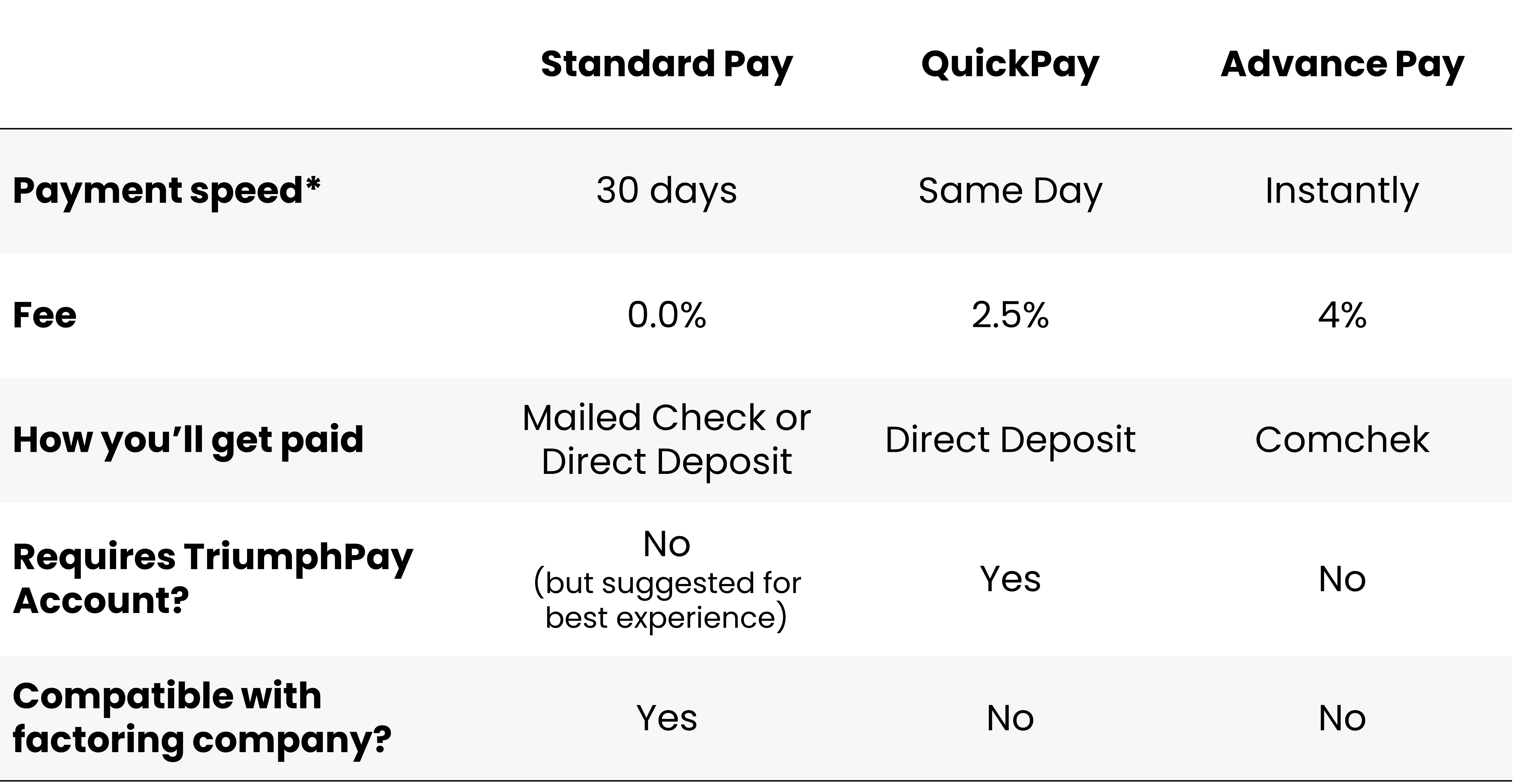
Payment Terms & Fees
- There is no fee to register for and use your TriumphPay account — it is completely free.
- You have three payment options with RXO; one option is free, the other two have associated fees.
- Standard Pay (the default payment option) is free, and you can manage Standard Pay payments in TriumphPay.
- QuickPay has a 2.5% fee per transaction, and can only be managed through TriumphPay.
- Advance Pay has a 4.0% fee, but cannot be requested or managed through TriumphPay (learn more).
New Users
Setting up TriumphPay
If you are new to TriumphPay, visit the online portal at secure.triumphpay.com to get started with your account and connect with RXO.
You can also download the TriumphPay mobile app and create an account to get started.
For detailed instructions about the registration process, please visit TriumphPay’s guide to registration.
Existing Users
Connecting TriumphPay & RXO
Already have a TriumphPay account? All you need to do is to connect with RXO in the platform. There are two ways to connect:
- Connect by broker (easier): Select the “By broker” tab to see a complete list of brokers; choose RXO and select “Verify” to receive a code, then agree to the terms of service.
- Connect by contact information: Use your phone number or email address to receive a verification message. Once you verify your information, you will be able to view brokers using the platform, including RXO.