Carrier Payment Options:
How to Get Paid with RXO

Not every carrier has the same cash flow needs.

Get paid in the way that best fits your business.


With RXO, you can choose between three convenient payment options.

You can also access additional financial services in the RXO Extra Carrier Marketplace, including factoring and LoadPay.

On this page, you’ll find everything you need to decide what’s right for you.

RXO payment options:
Standard Pay | Quick Pay | Advance Pay
Financial services from RXO Extra:
Factoring | LoadPay

How carriers get paid with RXO
 

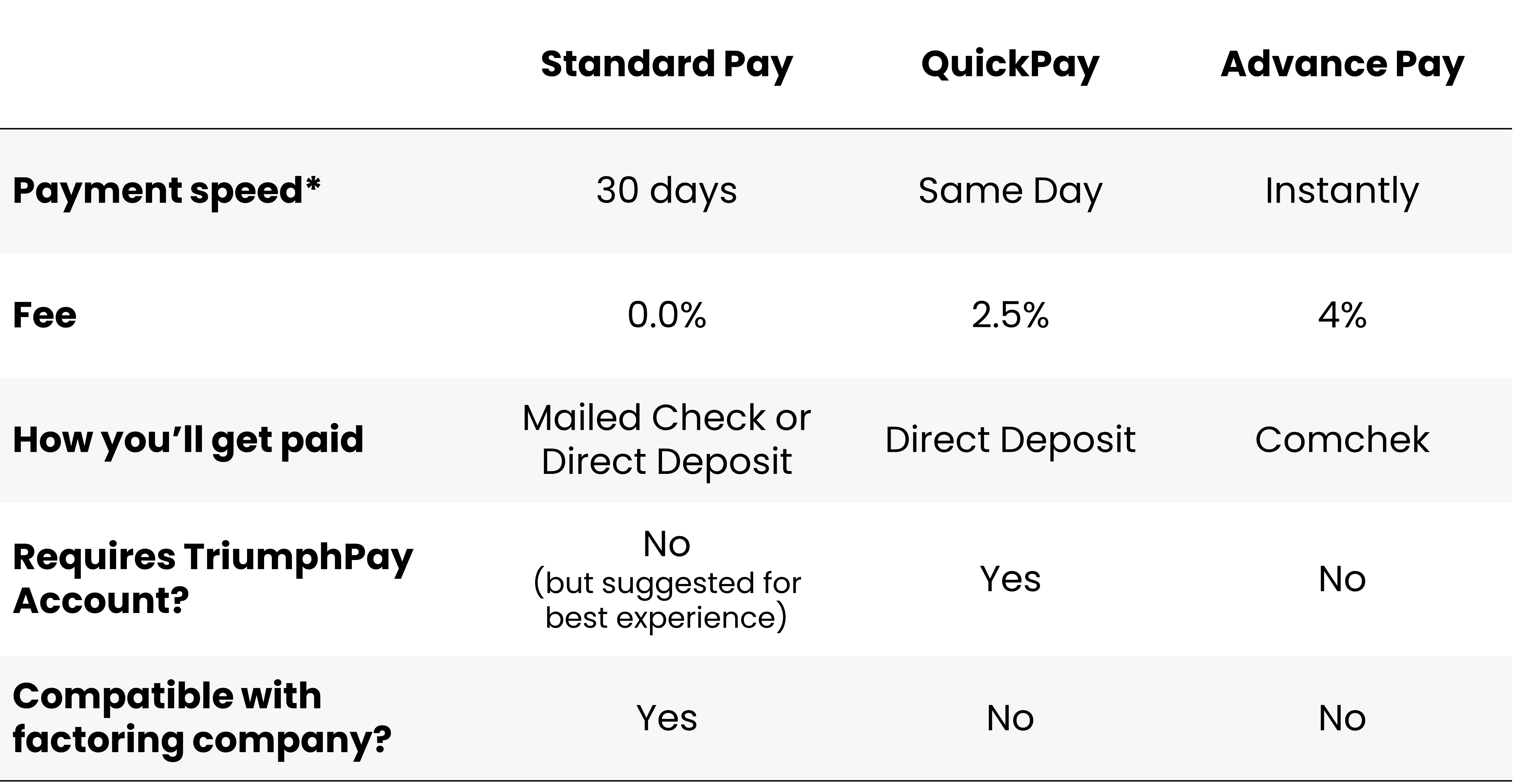
RXO Payment Options Overview

When you haul freight with RXO, there are three ways to get paid: Standard Pay, QuickPay and Advance Pay.

You can find more detailed information about each method in the sections below, but this table gives you an overview to quickly compare your options. You can also see even more information in the FAQ section.

*Payment speed begins after you submit your completed paperwork to RXO. Note that Advance Pay is only available during staffed hours (M-F, 06:00-21:00 ET).

RXO Standard Pay

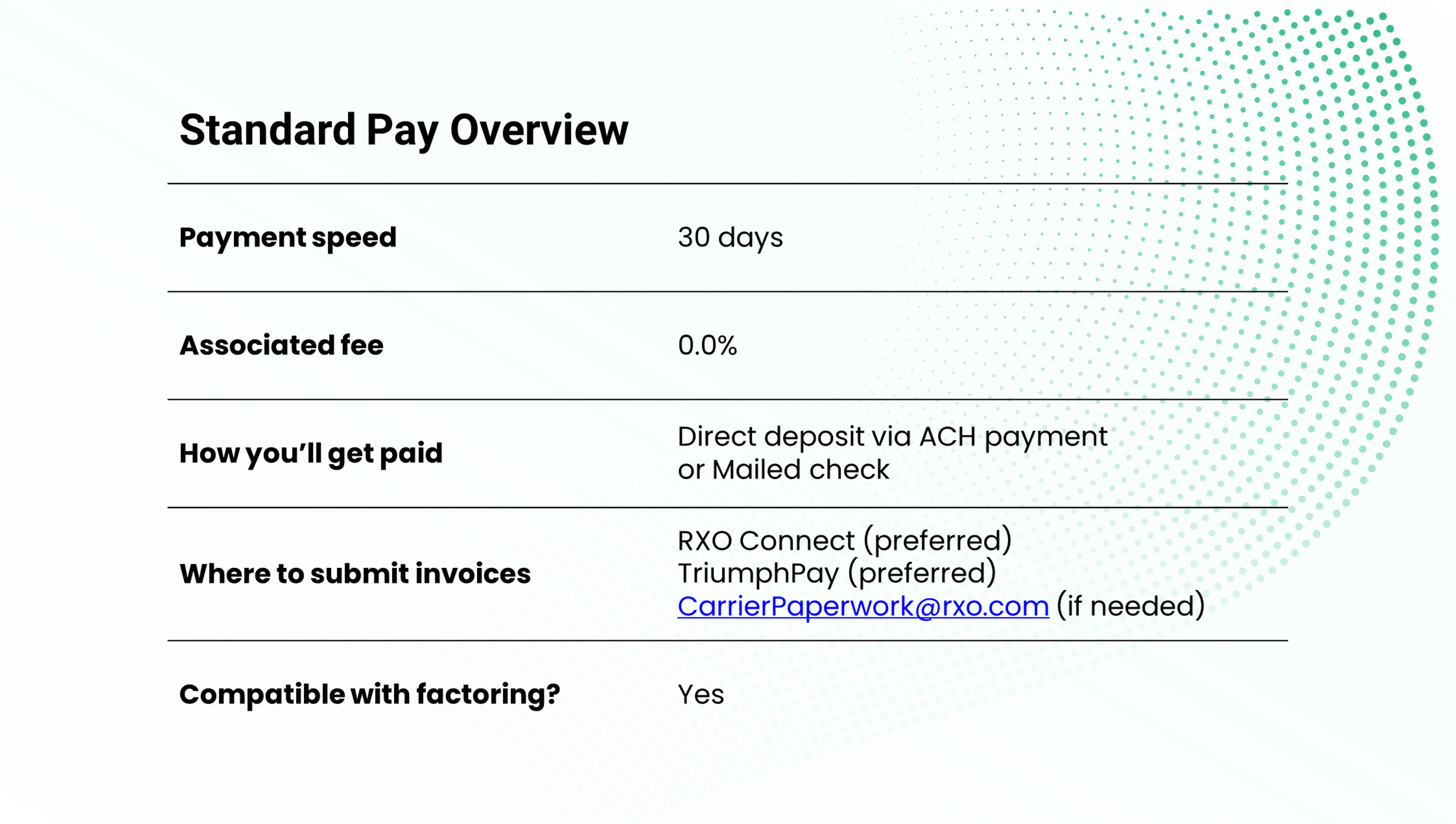
Standard Pay is the default carrier payment option — this is how we will pay you unless you opt for another payment option.

There are no fees associated with Standard Pay, and we will pay you 30 days from the date you submit your completed invoice.

Standard pay is ideal for carriers who want to avoid fees, have stable cash flow and can wait a little longer to get paid. This is also the only option for carriers who work with a factoring company.

Note that we work with TriumphPay to process carrier payments. While you do not need to enroll in TriumphPay to get paid on an RXO shipment, it is highly recommended for an ideal experience and necessary for full functionality (i.e., setting up a direct deposit to your bank).

Setting up TriumphPay is fast, free and easy — learn more about TriumphPay here.
 
Standard Pay Overview with RXO

RXO QuickPay

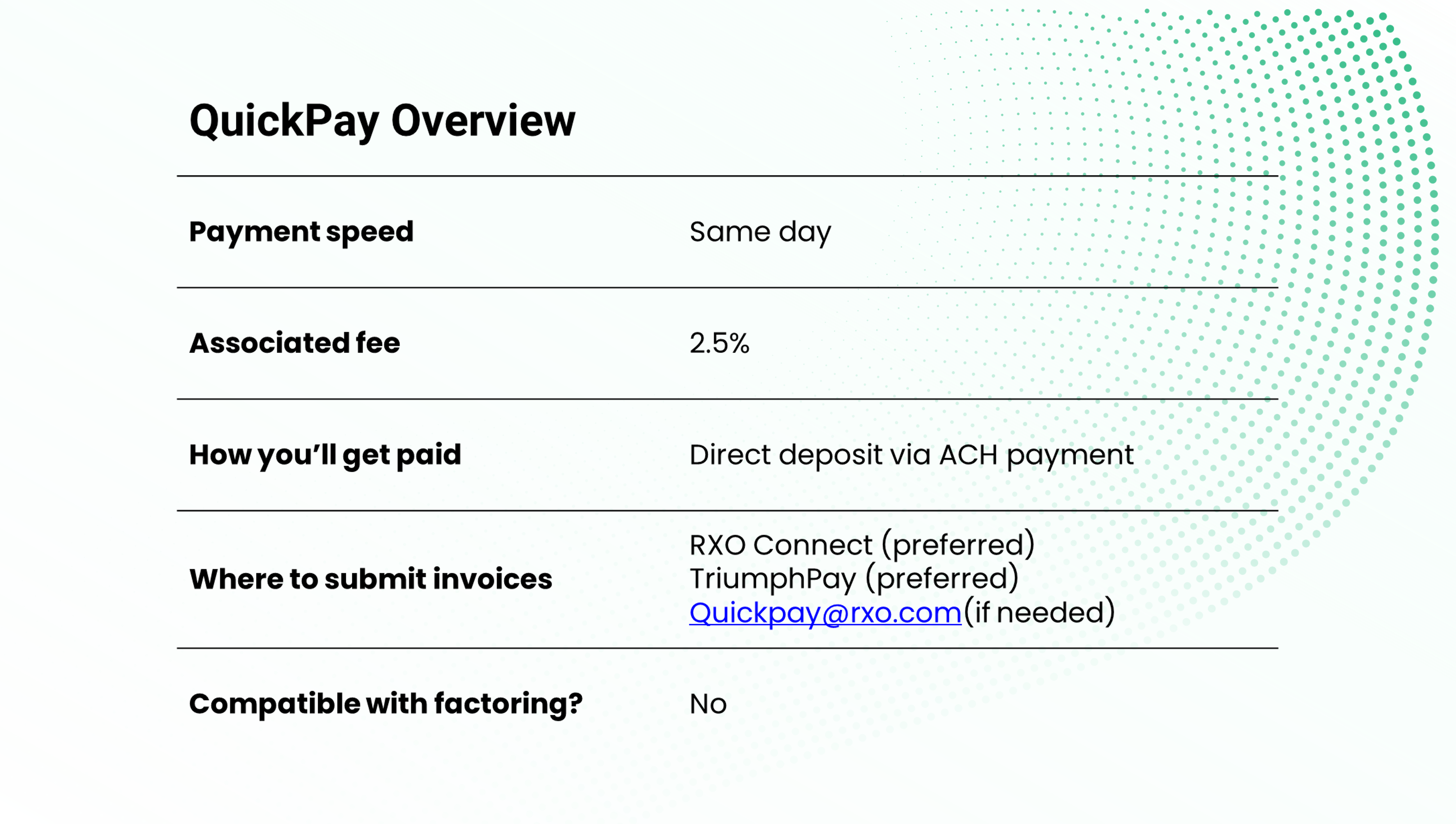
QuickPay is a great option for carriers who want more control over their cash flow through faster payments.

For a 2.5% fee per transaction, RXO will pay you on the same day (note that we will initiate payment on the day we receive completed paperwork, but it may take an additional day for the bank transfer to deposit into your account).

Once you enroll in QuickPay, you can use it as much (or as little) as you want, whether you want to set QuickPay as your default method or choose it for individual invoices.

To access QuickPay with RXO, you will need a TriumphPay account. Setting up TriumphPay is fast, free and easy — learn more about TriumphPay.
 
RXO QuickPay Overview

RXO Advance Pay

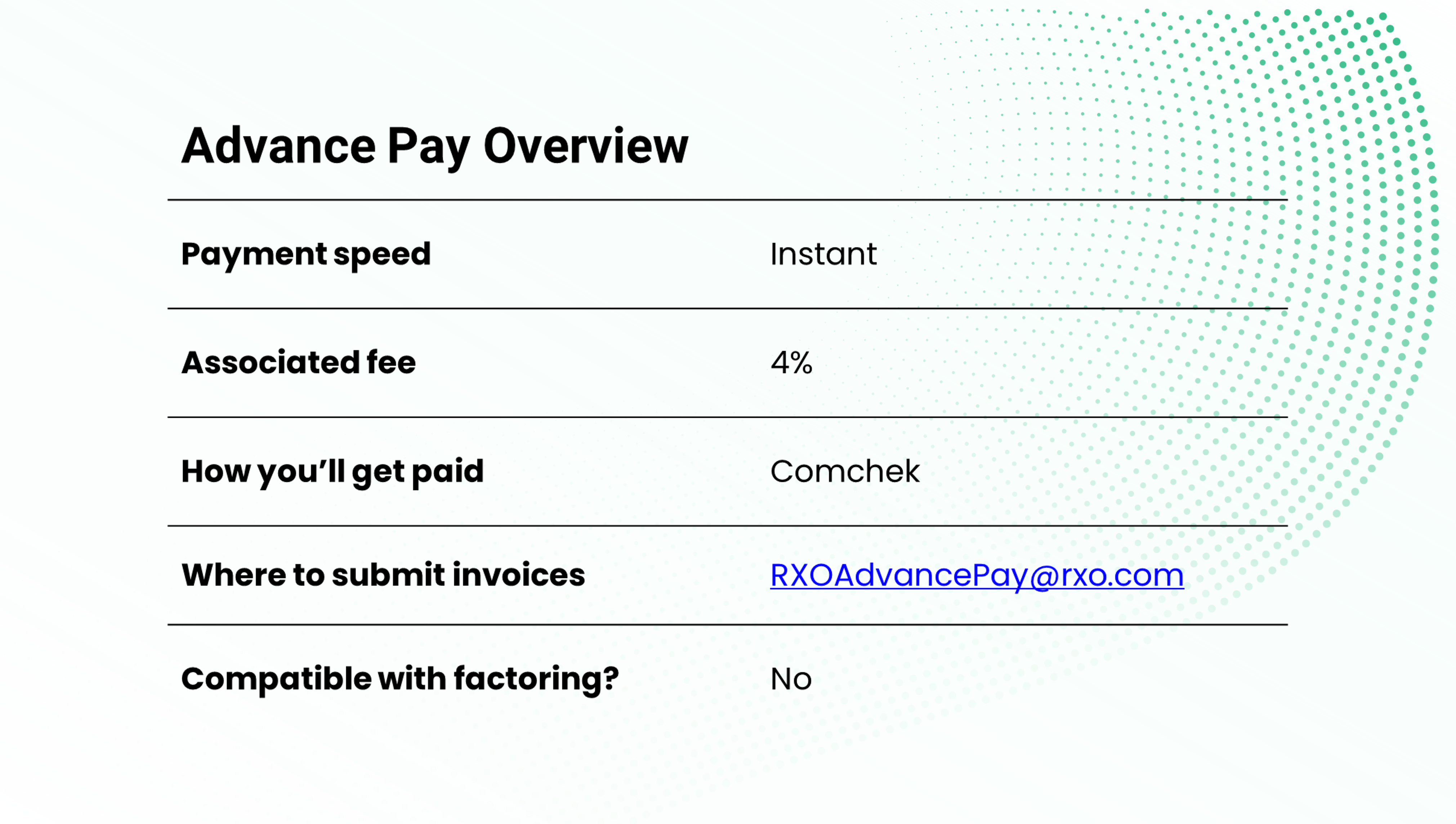
Advance Pay is the best option for carriers that want to get paid instantly without waiting for a bank transfer to clear.

For a 4% fee per transaction, RXO will pay you via Comchek within one hour from the time you submit your completed paperwork*.

You can cash the Comchek immediately, 24/7/365, at all major fuel stops, or fill out a Comchek draft to deposit into a bank account.

To be eligible to receive RXO Advance Pay, you will first need to fill out the Advance Pay form, which you can request from RXOAdvancePay@rxo.com.

Once you have been approved, you will need to request Advance Pay on a load-by-load basis from RXOAdvancePay@rxo.com.

*Advance Pay services are only available
during staffed hours (M-F, 06:00-21:00 ET).
Completed paperwork includes the driver’s
signed proof of delivery and an invoice for the
amount we owe you. 
 
RXO Advance Pay Overview

Carrier Financial Services </br> From RXO Extra


In addition to offering the three convenient payment options outlined above, RXO offers financial services to help keep your fleet’s cash flow running smooth through RXO Extra, our carrier marketplace.

RXO Extra Factoring

Looking for a factoring company to help make managing your finances easier? RXO has you covered.

Run credit checks before you haul, create invoices automatically, get paid within minutes after completing loads, access billing and collections support, and manage all your payments on a simple platform.


LoadPay™ Debit Account

Want an easier way to get paid, manage expenses, and instantly transfer funds, all without any monthly fees, account minimums, or application charges?

LoadPay™ makes getting paid and managing funds efficient, fast and simple for owner-operators and small fleets.

General Payment FAQs

RXO Advance Pay is the fastest way to get paid with RXO.

For a 4% fee per transaction, you will get paid within an hour via Comchek once your completed paperwork is submitted (note that timeframe is only applicable during the staffed hours of Monday through Friday, 06:00-21:00 ET).

You can also enroll in RXO QuickPay, which has a lower fee (2.5%) and will pay you same day via an ACH bank transfer (though the bank transfer may take an additional day to clear).

RXO Standard Pay, which is the default payment option, does not have any associated fees. With Standard Pay, we will pay you within 30 days from when you submit your completed invoice.

With Standard Pay, you can choose to get paid via mailed check or direct deposit.

Your default payment method will be RXO Standard Pay via a mailed check unless you opt for another method.

To set up direct deposit to your bank account, and/or opt in to RXO QuickPay, you will need to use your free TriumphPay account (note: if you already have a TriumphPay account, you do not need a new one). Learn more about TriumphPay here.

In the TriumphPay platform, you will need to connect with RXO. Select the broker tab to see a complete list of brokers, choose RXO then select “Verify” to receive a verification code and agree to the terms of service. Once you complete this, you will be able to change your payment preferences in TriumphPay.

To get paid with a Comchek from RXO Advance Pay, you will have to fill out the Advance Pay form first (request from RXOAdvancePay@rxo.com), then request Advance Pay on a load-by-load basis from the same email (or call 800-258-2304).

You can set up or change your banking information for direct deposits in the Triumph Pay platform. Connect with RXO in the TriumphPay platform, then make the updates you need.

TriumphPay is a third-party company that we have partnered with to provide a more efficient payment process to carriers in the RXO network.

TriumphPay is a payments network exclusive to the transportation industry. The TriumphPay platform will allow you to upload documents, check payment status, and manage your payment preferences for all your RXO loads.

While you do not necessarily need to use the TriumphPay platform to get paid with RXO, you will need to use TriumphPay to set up direct deposit, set up your factoring company (if applicable), enroll in QuickPay, or manage your payment preferences.

Learn more about TriumphPay.

If you work with a factoring company, you will need to assign them to your account in TriumphPay.

If you change factoring companies, you can set up new Notice of Assignment by reaching out to RXO@noa.triumphpay.com.

If you encounter accessorials while moving a load (e.g., lumper, pallet exchange, detention, etc.), you must report the accessorial charges to RXO within 24 hours and provide receipts for final payment.

Standard Payment FAQs

You do not have to do anything to get set up on Standard Pay — this is the default payment method unless you opt for something else (QuickPay or Advance Pay).

To set up a direct deposit to your bank account, you will need to use your free TriumphPay account (note: if you already have a TriumphPay account, you do not need a new one). Learn more about TriumphPay.

In the TriumphPay platform, you will need to connect with RXO. Select the broker tab to see a complete list of brokers, choose RXO then select “Verify” to receive a verification code and agree to the terms of service. Once you complete this, you will be able to change your payment preferences in TriumphPay.

You will need to submit a copy of the driver’s signed paperwork (proof of delivery) as well as an invoice for the amount we owe you.

For the fastest payment experience, submit the paperwork in RXO Connect or in TriumphPay. If you for some reason you cannot do one of those preferred methods, you can email your paperwork to CarrierPaperwork@rxo.com.

The fastest and most efficient way to get payment support with RXO is through the TriumphPay platform. You can submit a ticket, or you can use their live chat feature.

You can also reach the TriumphPay support team at 1-833-242-2114, which is staffed Monday through Friday, 08:00-17:00 CT.

Their team will be able to help you out in most cases, and if they cannot, they will escalate to us (RXO).

If you cannot use the TriumphPay platform or need to contact RXO directly, you can email APinvoices@rxo.com or call 1-833-872-5796, then select: option 4, option 1, and option 1.


While you do not necessarily need to use the TriumphPay platform to get paid with RXO, you will need to use TriumphPay to set up direct deposit, set up your factoring company (if applicable), enroll in QuickPay, or manage your payment preferences.

Learn more about TriumphPay.

If you already have a TriumphPay account, you do not need another one — all you have to do is connect with RXO in your TriumphPay.

Select the broker tab to see a complete list of brokers, choose RXO then select “Verify” to receive a verification code and agree to the terms of service. Once you complete this, you will be able to manage your RXO payments in TriumphPay.

You can track your payments in RXO Connect or in TriumphPay.

QuickPay FAQs

To set QuickPay, you will need to use your free TriumphPay account (note: if you already have a TriumphPay account, you do not need a new one). Learn more about TriumphPay.

In the TriumphPay platform, you will need to connect with RXO. Select the broker tab to see a complete list of brokers, choose RXO then select “Verify” to receive a verification code and agree to the terms of service. Once you complete this, you will be able to change your payment preferences in TriumphPay.

In the TriumphPay platform, you will either need to set QuickPay as your default payment option for all your RXO loads, or, if QuickPay is not your default payment option, select the load (or loads) where you want to use QuickPay and opt in for those specific loads only.

Once your preference(s) are set, you will need to submit a copy of the driver’s signed paperwork (proof of delivery) as well as an invoice for the amount we owe you.

For the fastest payment experience, submit the paperwork in RXO Connect or in TriumphPay. If you for some reason you cannot do one of those preferred methods, you can email your paperwork to Quickpay@rxo.com.

The fastest and most efficient way to get payment support with RXO is through the TriumphPay platform. You can submit a ticket, or you can use their live chat feature.

You can also reach the TriumphPay support team at 1-833-242-2114, which is staffed Monday through Friday, 08:00-17:00 CT.

Their team will be able to help you out in most cases, and if they cannot, they will escalate to us (RXO).

If you cannot use the TriumphPay platform or need to contact RXO directly, you can email APinvoices@rxo.com or call 1-833-872-5796, then select: option 4, option 1, and option 2.

Yes, you will need a TriumphPay account to access QuickPay with RXO.

Learn more about TriumphPay.

You can track your payments in RXO Connect or in TriumphPay.

Advance Pay FAQs

In order to get paid with RXO Advance Pay, you will first need to fill out an RXO Advance Pay form, which you can request from RXOAdvancePay@rxo.com. Note that carriers who work with a factoring company are not eligible for Advance Pay.

Once we have a completed form on file, you will be able to request Advance Pay on individual loads.


You must request Advance Pay on a load-by-load basis. This service is available Monday through Friday, 06:00-21:00 ET.

Once we have your completed form on file, you can request Advance Pay on a load by digitally submitting your signed paperwork (i.e., proof of delivery) and an invoice for the amount RXO owes you to RXOAdvancePay@rxo.com.

Once we process your request, we will issue a Comchek code to the Main Contact in your completed Advance Pay form within one hour of your submission.

No, you will need to request Advance Pay on a load-by-load basis.

For support, reach out to RXOAdvancePay@rxo.com or call 800-258-2304.

No, you do not need a TriumphPay account to access RXO Advance Pay.

Furthermore, you cannot request Advance Pay via TriumphPay — you have to reach out to RXOAdvancePay@rxo.com or call 800-258-2304.

If you want Advance Pay on a load, do not submit your paperwork in Connect or TriumphPay, otherwise it may initiate payment in your preferred payment method (either Standard Pay or QuickPay) instead.

You can track your payments in TriumphPay or RXO Connect.